Maintenance procedures exist to prevent error. Too often they produce it. A U.S. Federal Aviation Administration review of research by NASA researcher Barbara Kanki and colleagues found that procedural errors, meaning information-related errors that involve documents, were implicated in 44% to 73% of maintenance errors (FAA summary of procedural non-compliance research).
That range is wide, but the message is narrow. A document that omits a value, points to the wrong figure, or allows two readings turns a competent technician into a guesser. Writing maintenance procedures is an engineering control, not a formatting task.
A workable method runs from task scope to a test with a real technician. Each stage produces something a reviewer can check, and no stage ends with the sentence "the grammar looks fine."
Table of Contents
- Why Procedure Wording Drives Maintenance Errors
- Six Stages from Task Scope to Validated Procedure
- Control Terminology Before You Draft
- Write Direct, One-Action Sentences
- Phrase Warnings, Cautions and Conditions Clearly
- Rewrite a Complete Task Card
- Validate the Procedure with Real Technicians
- Run a Final Check Before You Release the Procedure
Why Procedure Wording Drives Maintenance Errors
Documentation failures take different forms. The FAA review found that inspection and verification problems appeared in 34% of cases, incomplete documentation in 27%, and incorrect documentation in 22% (FAA summary of procedural non-compliance research). An analysis of 458 maintenance-technician reports to the Aviation Safety Reporting System, summarized in the same review, found missing information in 48% of reports, with incorrect, difficult-to-interpret and conflicting information each at 19% (FAA summary of procedural non-compliance research).
Each defect disrupts the task at a different point:
- A missing value leaves a gap. Without a torque figure, clearance or wear limit, the technician must stop or rely on memory.
- A wrong reference directs the action to the wrong item. The technician may follow the step correctly and still remove the wrong part.
- An ambiguous sentence leaves a decision to the reader. Two technicians can interpret the same instruction differently and produce different results.
- Conflicting instructions weaken trust in the document. A reader may fall back on habit, which the procedure cannot control or document.
Spell check cannot catch these failures. They often survive review because someone who knows the task fills in missing information automatically, like a reader mentally completing a familiar sentence.
Use a live procedure to check for these gaps. Mark each sentence that lacks a needed value, points to an unclear reference, or allows more than one interpretation. Then ask a technician to follow the procedure and explain what each step requires. Their questions and choices reveal where the wording fails in practice.
Six Stages from Task Scope to Validated Procedure
Most defects are created before the first sentence is written. A writer receives a work request, opens the previous revision, improves the wording, and sends the file for approval. Nothing in that loop fixes the start state, the end state, the tooling, or the way the finished document gets tested.
A risk-based workflow gives six stages. Each stage has an output and a pass test, and a draft reaches formal review only when all six have produced theirs.
- Define the task boundary. State the start point, the end state and what the procedure does not cover. Without that boundary, scope creeps into the steps and readers argue about when the task is finished.
- Collect prerequisites. List the tools, parts, qualifications and configuration needed before the first physical action. A prerequisite discovered at step 14 becomes a workaround.
- Sequence the actions in the order they must happen, with one verifiable action per step. When two actions share a step, a reader can complete one and skip the other.
- Add states, values and criteria. Record configuration states, measurements with units, tolerances, instrument requirements and acceptance criteria. A torque value with no tolerance and no named instrument leaves a technician with a number and no way to judge it.
- Place cautions, warnings and restoration steps where they apply. Safety notes belong before the action they cover, and restoration steps belong at the end of the task rather than in a separate section.
- Validate with representative users in a real or simulated work area. Record where they stop, re-read or ask a question, then revise.
The stakes justify the discipline. The FAA technical report on manual development cites a study of maintenance-failure records in which procedure usage was the leading contributing factor, at 116 cases, 30% of the total, and 49% of the recorded financial loss. The same work names the recurring weaknesses in aviation manual development: reactive user evaluation, limited procedure validation, weak error tracking, and no quality metrics.
| Stage | Output | Pass test |
|---|---|---|
| 1. Define the task boundary | Start point, end state and scope | A reader names the task and its end state in one sentence |
| 2. List prerequisites and tooling | Tools, parts, qualifications and configuration | Every item appears before the first physical action |
| 3. Sequence the actions | Ordered steps with one action each | Each step can be verified on its own |
| 4. Add states, values and criteria | Configuration states, measurements and tolerances | Every value has units, a tolerance and an instrument |
| 5. Add cautions, warnings and restoration | Safety notes and restore steps | Each warning appears before the action it covers |
| 6. Validate with representative users | Error log and revision history | A qualified technician completes every step without inference |
Do not approve a procedure because its grammar is correct. Approve it when the sequence, the tooling assumptions, the visual references and the field use all hold up.
Control Terminology Before You Draft
A component with three names can look like three different parts to a technician. Set terminology before drafting so every step points to the same object.
ASD-STE100 approves a limited set of general words. Each approved word normally has one meaning and one part of speech. The ASD-STE100 overview describes a general dictionary of about 900 approved words and an unapproved list of about 1,200 entries, most with a suggested replacement.
The one-meaning rule helps prevent ambiguity. “Fall” describes downward movement caused by gravity, not a decrease. Write “The pressure decreases” instead of “The pressure falls.” A familiar word used for several technical meanings can confuse mechanics and translators.
Build a Product Term List
Before drafting, list each component, tool and state, then choose one name for each. Use that name throughout the procedure. If a pump drive is called a unit on page two, a module on page five and an assembly on page nine, a technician may not know whether those terms refer to the same part. A translator faces the same uncertainty.
Record technical names and verbs that the dictionary does not cover. The controlled vocabulary describes general English, not every product. The requirement is consistency across the document.
Why Translators Gain From the Same Rule
Using one term for each object and state gives translators a clear source to work from. They do not have to infer whether different words refer to the same part or condition.
A guide to the ASD-STE100 dictionary explains how the official word list is organized. Check the specification when you need to confirm an exact entry.
Practical rule: If a sentence needs a word the dictionary rejects, first check whether an approved word expresses the same meaning. Use a product term when no approved word fits.
For more on applying controlled language in technical writing, see the guide to controlled language.
Write Direct, One-Action Sentences
ASD-STE100 sets two sentence limits, and the difference tells a writer what the standard expects a procedure to do. Under Issue 9, a procedural sentence can hold a maximum of 20 words, and the same limit applies to warnings, cautions and other safety instructions. Descriptive text gets 25 words, because an explanation sometimes needs more room (ASD-STE100 Issue 9).
Twenty words isn't the target. One action is. A line such as "Remove the panel and inspect the connector before you install the replacement part" packs three actions and a hidden order into one sentence. Split it before it reaches the limit: "Remove the panel. Inspect the connector. Install the replacement part."
Command Form, Not Passive Form
Procedures use the direct command. The official FAQ contrasts "Install the component" with "The component must be installed" (ASD-STE100 FAQ). The passive version never names who acts, so the reader has to work out that the instruction is meant for them.
Place the action verb first when the operator is obvious. "The retaining ring should be removed before the cover is opened" becomes "Remove the retaining ring. Open the cover." Passive voice still appears in limited descriptive text, such as when nobody knows who performed an action. Inside a step, it hides accountability.
| Before | After | Rule applied |
|---|---|---|
| The retaining ring should be removed before the cover is opened. | Remove the retaining ring. Open the cover. | Direct command, one action per sentence |
| Remove the panel and inspect the connector before you install the replacement part. | Remove the panel. Inspect the connector. Install the replacement part. | One action per sentence, hidden order made explicit |
| Make sure the cover is closed and all bolts are tight before you start the engine. | Close the cover. Tighten all bolts. Start the engine. | One action per sentence, order kept |
Each rewrite keeps the technical meaning and the order of work. A rewrite that changes the sequence has introduced a new defect instead of removing one.
Length alone doesn't make a step usable. "Check the connection for proper condition" is short and still unverifiable, because "proper condition" names no acceptance criterion. The length limit buys room for a specific object, a specific value and a specific result. The writer still has to supply all three.
Explanations of these rules are summaries. Where a summary and the official specification differ, the specification is correct.
Habit to build: read each step aloud and count the actions. Two verbs mean two steps.
Phrase Warnings, Cautions and Conditions Clearly
A warning, a caution and a note do three different jobs. A reader who learns to distrust one label stops reading all three.
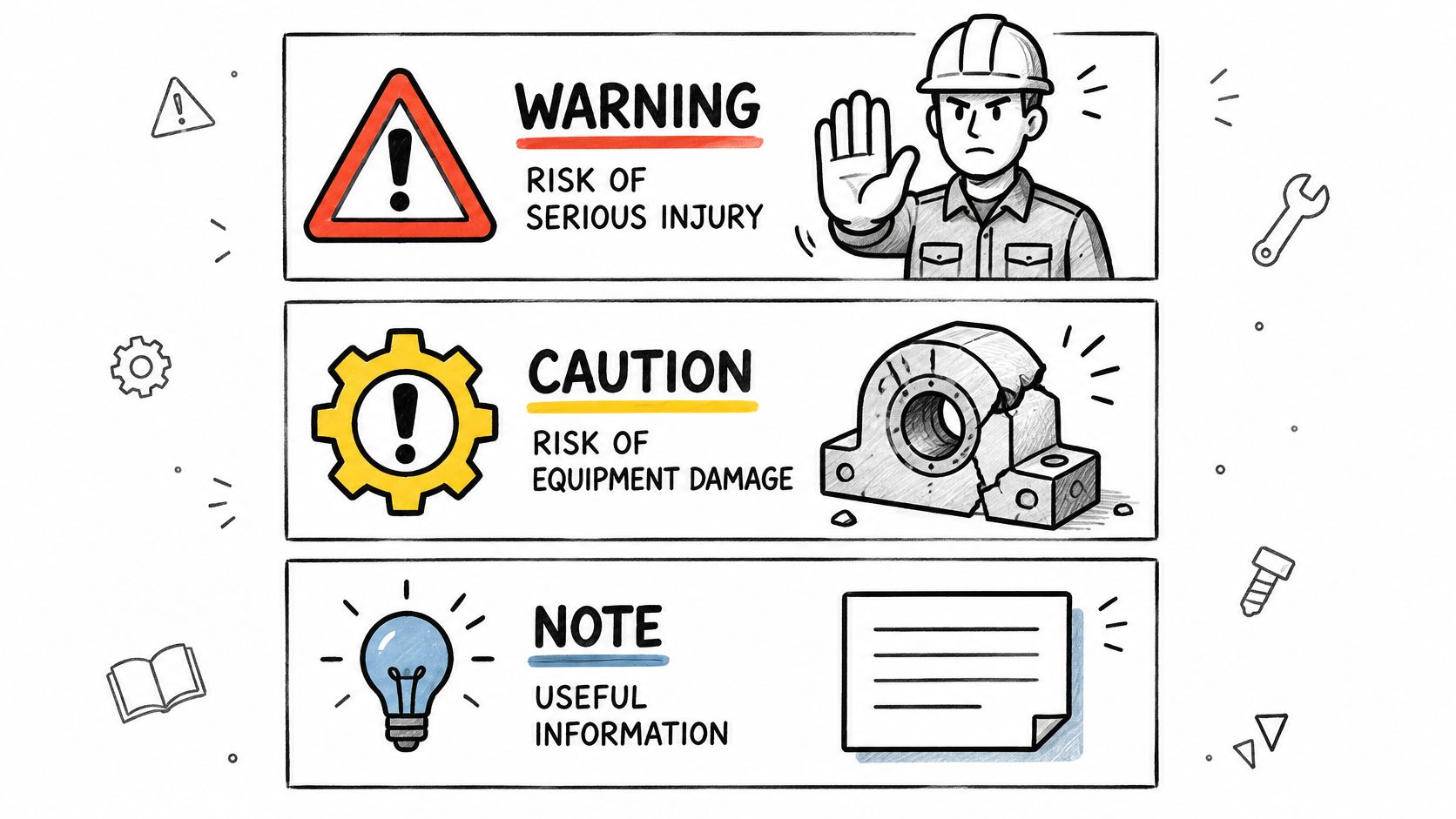
A warning addresses the risk of injury. A caution addresses the risk of damage to equipment. A note adds information and carries no hazard. Keep the three separate, and never use a caution for a hazard that can hurt someone.
Placement decides whether a safety note works. Put the hazard statement before the action it covers. A warning printed after the step arrives too late, and a warning parked at the top of a section gets skipped by anyone who jumps straight to step 12.
Phrase the note in three parts: the hazard, the consequence, the protection. Short sentences, no hedging.
Before: The housing may get hot, so be careful when you touch it.
After: Let the engine cool before you touch the housing.
The first version transfers the judgment to the reader and gives no limit. The second names the required state and the action that follows from it.
State the Condition First
Conditional steps read badly when the condition arrives late. "If the hydraulic line is still pressurized, do not disconnect it" works because the condition comes first and the action second. Reverse the order and the reader has started the action before learning the condition.
Every condition also needs a stated alternative for the case where it isn't met. "If the pressure gauge reads zero, continue. If it doesn't, close the isolation valve and bleed the line" tells a technician what to do at the branch. A condition with no alternative forces an unplanned decision in the hangar.
One warning covers one hazard. Repeat a specific warning before each affected step, because a general statement at the section head doesn't protect anyone at the moment of the task.
Final check on any safety note: does it say who must act, what is at risk, and what happens next?
The difference between the three note types, with worked examples, is covered further in warning vs caution in technical writing.
Rewrite a Complete Task Card
A single sentence can pass a length check and still leave the order of work invisible. Take an illustrative original step:
Remove the cover and check the connector for damage before you replace the connector, making sure the power is off.
Three problems sit in that line. Four actions share one sentence. The order hides inside a subordinate clause. The power check arrives last, where it reads as an afterthought rather than a precondition.
The rewrite gives each action a numbered position:
- Make sure the power is off.
- Remove the cover.
- Inspect the connector for damage.
- Replace the connector.
- Install the cover.
The warning goes above the step it protects, not at the end of the card: "Hazardous voltage can cause injury. Make sure the power is off before you remove the cover."
Nothing in the rewrite changes the work. The order survives, and every step can be checked alone. Real values, tolerances and part numbers come from the approved maintenance data for the aircraft, not from an example.
Reviewers should sample whole task cards rather than isolated sentences, because defects cluster around sequence and sign-off points. A documented aviation case involving a hurriedly developed task card found errors in 1.5% of responses and 20.8% of task cards (FAA human factors operating manual). A sentence-level edit misses both.
More before-and-after cards are collected in work instruction examples.
Validate the Procedure with Real Technicians
A procedure is ready for release when a qualified technician can execute every step without inference, identify the required configuration and acceptance result, and recover safely from an abnormal condition. A language check proves none of that.
The Comprehension Review
Hand the page to a technician and ask for five things, using only the page: the tool, the component, the direction, the limit and the next action. Wrong answers map straight to a sentence that needs work. Run the review on complete task cards, and keep the sample wide enough to cover every branch and every conditional step.
The Representative-User Test
Watch a technician run the task in an actual or simulated work area. Note every point where the reader stops, re-reads a line, reinterprets an instruction or asks a question. Time the task and count the errors, because a procedure that works but doubles the job time gets abandoned on a busy shift.
Check that the diagrams match the physical layout too. The FAA human factors guide for maintenance recommends validating procedures against human-factors techniques, running usability beta testing, and revising documents after users report confusion or errors. It also reports that mechanics made fewer errors and used less time when task cards matched the spatial layout of the work area. Layout is part of the procedure, not decoration around it.
The Defect Log
Record each finding by type: omission, commission, wrong reference, misunderstood wording, or planning difficulty. The category tells a documentation manager which fix applies. An omission needs a missing value. A planning difficulty needs a resequenced card.
Tie every reported defect to its correction and keep the record with the procedure revision. Without that link, the same error returns at the next update and nobody can prove it was closed.
A grammatically clean procedure can still be unsafe. If the sequence, the sign-off points or the orientation of the drawings don't match the job, the document is wrong in the way that matters most. The rule a manager can enforce is simple: no procedure ships without a signed test record from a technician who didn't write it.
Run a Final Check Before You Release the Procedure
A final check catches avoidable gaps before release. Use this short checklist to focus the review on issues not covered in detail earlier:
- One action per step. Split any step that asks the reader to do more than one task.
- Terms match the list. Use the approved general word or the product term recorded in the glossary.
- Values are complete. Include the required units, tolerance, and named instrument.
- Resolve checker flags. Review each flagged item against the writing rules and the official specification.
The free STE Checker checks your own text for common STE problems. Use the output as a starting list for review. It is a heuristic tool, so it can miss problems or flag correct text, and it is not an official ASD-STE100 conformity check.
Use the writing rule summaries and worked examples to assess flagged wording. If a reviewer disputes a rule, check it against the official ASD-STE100 Issue 9 specification.
Run the checker on a live procedure, then review its flags and confirm the steps with a technician. The tool can help identify wording to examine, but only a real user can show whether the instructions work during the task. STE Guide is a free, independent educational resource with tools and examples for technical writers, engineers, translators, and students. Visit STE Guide to use the checker as part of that final review.