A correct maintenance step can still cause harm. The reader only needs to read one word in the wrong sense. The ASD-STE100 history page traces the project to 1979, with development across approximately 46 years to Issue 9 in 2025. That long history exists because inconsistent maintenance English created real risk.
Safety content increases the cost of ambiguity. A lockout/tagout step must state one action in one order. A personal protective equipment instruction must not hide the required item in a long sentence. Hot work and confined space warnings must state the hazard before the work starts.
General style does not control these risks in the same way. Some technical documentation standards control each sentence. Others control structure, review process, or reuse only. A standard can improve polish and still leave a hazardous step unclear.
This list compares eight standards and frameworks by safety use. Each entry states what the standard controls. Each entry also states where the standard does not help. Practical rewrite examples show the difference at sentence level.
STE Guide is an independent educational resource. It isn't an official ASD source. Readers must check the official specification for exact ASD-STE100 rules.
Table of Contents
- 1. ASD-STE100 Simplified Technical English
- 2. Microsoft Writing Style Guide
- 3. Google Developer Documentation Style Guide
- 4. ISO/IEC/IEEE 26511 Series for User Documentation
- 5. DITA (Darwin Information Typing Architecture)
- 6. IBM Style Guide
- 7. S1000D International Specification for Technical Publications
- 8. Diátaxis Documentation Framework
- How the Eight Standards Differ in Scope and Control
- Match the Standard to Your Manual's Safety Risk
1. ASD-STE100 Simplified Technical English
ASD-STE100 is a controlled subset of English for technical documentation. It was developed for aerospace maintenance. The ASD Simplified Technical English Maintenance Group, or STEMG, maintains it. The standard limits vocabulary, grammar, and sentence construction so readers get one clear meaning.
The STEMG training material describes 53 writing rules in 9 sections and a dictionary of approved words. Exact counts can change between issues, so check the official specification. Approved words carry controlled meanings. Writers don't choose synonyms freely. That control matters when non-native English speakers read safety steps under time pressure.

Safety rewrite and limits
The official Issue 9 PDF supports the principle that an approved word must carry its approved meaning in that sentence. A word can sit in the dictionary and still be wrong in context. Writers must check the definition, not the word alone.
Before: Once the cover has been removed, the filter may be cleaned by the technician. After: Remove the cover. Clean the filter.
A lockout version makes order explicit. Before, a sentence buries isolation after cover removal. After, the text reads, "Stop the machine. Lock the switch. Remove the cover." Each sentence gives one instruction. The pump example follows the same logic. "The pump should be checked regularly" becomes "Check the pump each week. Make sure the pump operates correctly."
ASD-STE100 doesn't set lockout policy, permit rules, or hazard thresholds. Subject specialists must supply correct technical content first. The standard controls how that content reads.
- Start with summaries: Read the writing rules overview before the full specification.
- Check words: Check unfamiliar terms in the ASD-STE100 dictionary guide.
- Compare drafts: Use worked ASD-STE100 examples during revision.
- Find probable issues: Run drafts through the free STE checker. It's heuristic, not an official conformity tool.
- Get exact rules: Follow guidance to the official ASD-STE100 PDF.
2. Microsoft Writing Style Guide
Before: An error has occurred that prevents the file from being saved. After: The file did not save. Close the file and try again.
That edit shows the guide's whole method. The Microsoft Writing Style Guide is a public style reference for product documentation, interface text, and technical articles. It sets guidance for tone, grammar, punctuation, terminology, and inclusive language. Large teams use it to keep one voice across help pages, dialogs, and error messages.
Safety content gets the same plain treatment. "Personnel should utilize protective eyewear prior to grinding" becomes "Wear safety glasses before grinding." The verb is direct and the order is clear. Guidance on how to change passive to active voice supports that edit.
Plainness has a limit. The guide doesn't bound vocabulary. A writer can pick a clear synonym on one page and a different synonym elsewhere, and readers must decide whether the action changed. It doesn't define warning levels or required procedure order, and it doesn't restrict a verb to one approved meaning. A safety manual that relies on it still needs a controlled language or a local safety style sheet for hazard text.
The guide earns a place in a safety workflow for different reasons:
- Editors resolve everyday style questions fast.
- One voice scales across many writers and products.
- A team glossary beside it records local terms and exceptions.
- A stricter safety layer can sit on top when text can cause physical harm.
3. Google Developer Documentation Style Guide
The imperative sentence is this guide's main tool. Every task step names the actor through its verb, and that habit alone fixes most of the vagueness that creeps into procedures.
Google's guide is a public reference for developer documentation. It covers API references, tutorials, and technical articles for software audiences, and it favors plain, direct language that readers in many countries can follow. Its rules cover word choice, capitalization, code format, and sentence structure. Global software teams use it to keep tutorials and reference pages consistent, and translation teams benefit because short sentences carry fewer hidden relations. Code formatting rules reduce confusion between prose and commands, so a reader never mistakes a flag for a filename.
The method shows in its own rewrites. "The API can be invoked by a client application in order to retrieve the data" becomes "Call the API to get the data." The actor returns, the filler goes.
The same edit works on hot work text.
Before: Please note that sparks may be generated during grinding operations. After: Grinding makes sparks. Remove flammable material first.
The hazard and the preventive step now appear in order. For a maintenance audience, that ordering matters more than elegance.
| Built into the guide | Left to your team |
|---|---|
| Actor-first imperative steps | Approved meanings across a manual set |
| One style for code and commands | Warning templates and severity levels |
| Sentences that translate cleanly | A review process for physical risk |
Plain software style improves readability. It does not prove that a warning contains the hazard, the consequence, and the required action. Teams writing for maintenance hazards pair the guide with explicit warning templates and a local safety style sheet.
4. ISO/IEC/IEEE 26511 Series for User Documentation
Before: "Approval of the isolation procedure has been obtained by the responsible parties." After: "The safety engineer approved the isolation procedure on 12 March." The rewrite fixes the sentence. ISO/IEC/IEEE 26511 governs the approval behind it.
The series sets requirements for user documentation processes. It covers how acquirers and suppliers plan, develop, and review user information. The focus is process and quality management, not sentence-level style. A contract can list required manuals and review gates. A supplier defines drafting, technical review, approval, and release steps. That structure supports audits and supplier control.
Process control pays off on safety content. A named reviewer can check a confined space procedure against current site rules. Approval records show who accepted the warning text. Change control stops an old isolation step from surviving into a revised manual.
Freshness is the weak point. The 2025 State of Docs survey covered 444 documentation professionals, and more than half identified keeping documentation up to date as a major challenge. A process standard only helps when owners act on review triggers.
Process approval doesn't make a hazardous sentence clear. Pair it with explicit writing rules for warnings and steps. A conforming workflow runs in this order:
- Draft the procedure.
- Run a technical review against the product.
- Run a safety review of warnings and hazardous steps.
- Record approval by a named role.
- Release, then link each product change to a documentation review task.
Check the official standard before any compliance claim.
5. DITA (Darwin Information Typing Architecture)
Start with the problem DITA solves. Three chapters of a maintenance manual state lockout in three different ways. Consolidated into one task topic, the steps read: "Stop the equipment. Isolate the energy source. Apply the lock." Each chapter reuses those steps in that order. The wording can no longer drift apart.
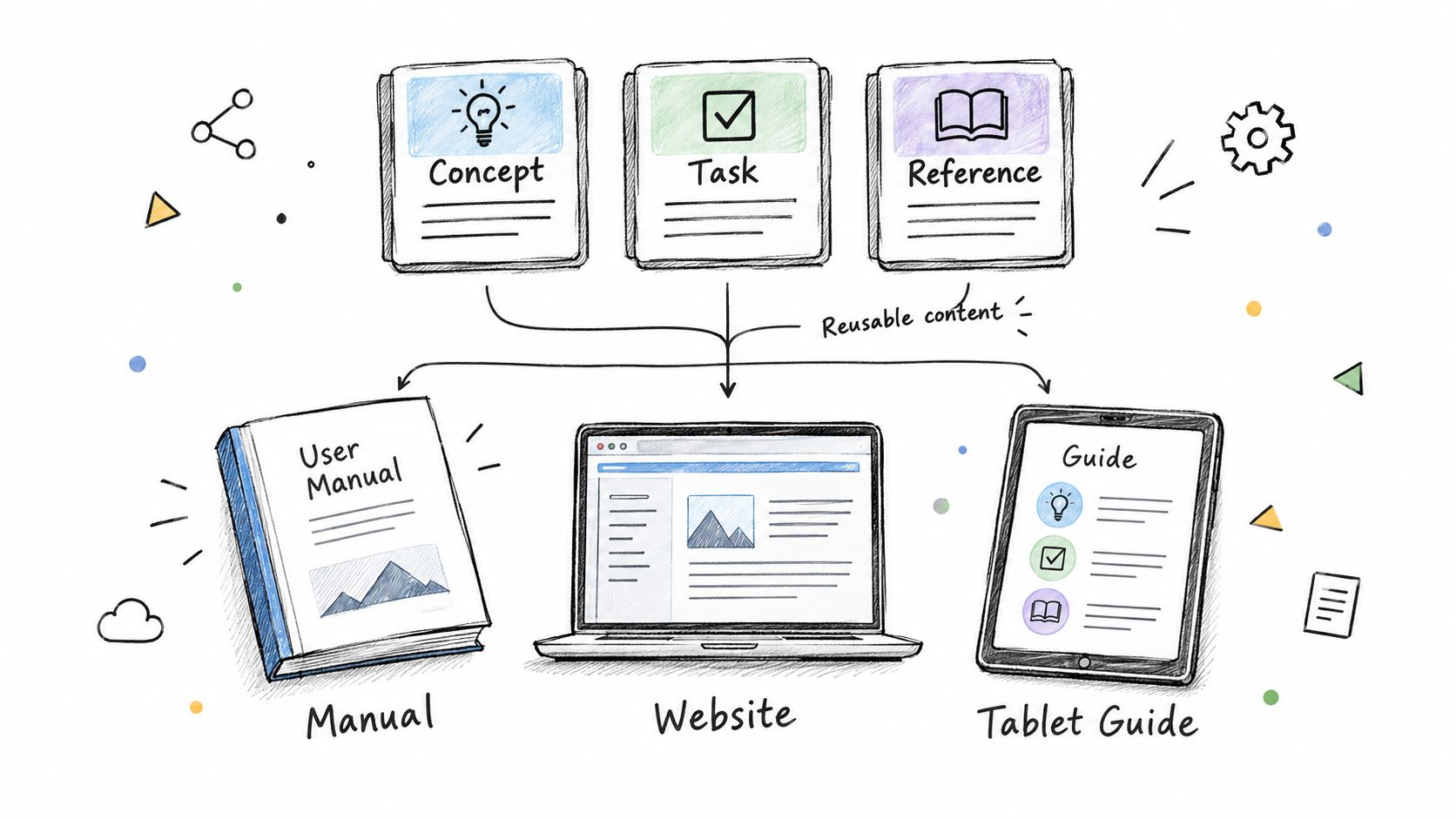
DITA is an open XML architecture for topic-based authoring, maintained by OASIS as a standard. Writers build small topics for concepts, tasks, and references. Publishing tools assemble those topics into manuals, help sites, and PDFs, so a warning topic can appear in several procedures without retyping. Reuse also helps translation because repeated text stays identical.
Where reuse helps and where it stops
Reuse spreads whatever the source topic contains, including a weak warning. Writers must improve the source topic first. Reuse then spreads the corrected text. A single PPE topic can serve grinding, cutting, and drilling procedures, but only if the underlying instructions are already clear.
Adoption evidence is positive. The 2020 DITA Satisfaction Survey report found 76% of organizations using DITA were satisfied, while approximately 14% reported dissatisfaction.
DITA still leaves writing quality to the writers. It doesn't control word meaning or sentence length, and it adds tool and content model work before migration. Pair the structure with explicit writing rules for warnings and step order.
Match each topic to its type: task topics for procedures, reference topics for data. Keep every reusable unit complete and short. Define the content model and tools before conversion. After rollout, track reused warnings and translation volume to confirm the effort paid off.
6. IBM Style Guide
IBM Style Guide ranks well for disciplined prose, and lower for hazard control. It covers grammar, punctuation, word choice, and style for product documentation. It favors plain language that supports translation. Its strength is repeatable decisions across manuals, online help, and developer content.
Before: Click on the button in order to save. After: Click Save.
That compression matters in a warning. "The user is required to perform the following steps in order to configure the device" becomes "Configure the device. Follow these steps." A confined space line needs the same treatment: "Entry should not be undertaken until atmospheric testing has been completed" becomes "Test the air. Do not enter until the result is safe." A practical definition of clarity in writing explains why the actor and limit must appear together.
Where IBM helps, and where control stays external
The IBM-specific advantage is its accessibility and translation guidance. Those chapters push teams toward labels, structure, and wording that stay usable when a warning is resized, read by assistive technology, or localized. Microsoft handles similar ground from a product-voice angle; IBM is more useful when a warning must remain consistent across global content sets.
The limit is decision authority. IBM can put the action first and cut filler. It cannot decide that gas presence stops work, set the severity of the consequence, or prove that every output places the hazard before the step.
- Settle editorial questions: Use it for grammar, punctuation, capitalization, lists, and interface actions.
- Use the accessibility and translation chapters: Apply them to warning labels and localized hazard text.
- Add a safety layer: Define severity, trigger conditions, and forbidden actions in your own conventions.
- Check order in output: Confirm the warning appears before the step in print, help, and mobile views.
7. S1000D International Specification for Technical Publications
S1000D works on safety content as data. The international specification serves aerospace and defence programs that manage maintenance, operation, and support information. It stores each warning and procedure step as a data module inside a common source database, and an international steering committee maintains the specification.
Reuse is the main safety mechanism. One warning module can feed several maintenance publications, so a hot work precaution never splits into differently worded versions across the fleet. Interactive delivery adds applicability filtering: the technician sees only the modules that match the equipment configuration in front of them. Fewer wrong-variant instructions means fewer wrong actions.

Reuse depends on module design
Applicability control protects procedure order only when the data is modeled well. A badly drawn module boundary can split a warning from the step it governs. Reuse then copies that error into every publication that pulls the module. Writers and tool administrators carry the design burden together, and neither side can skip it.
A manual that repeats precautions with small wording changes lets versions drift apart. The fix is one authoritative module: "Stop work if gas is present. Remove flammable material. Post a fire watch." Each applicable procedure pulls that same module ahead of its task steps. Detailed work instruction examples show why step order must stay visible when content is modular.
Rollout follows a set order:
- Define the data module structure before authoring starts.
- Apply a writing standard inside each module so sentences stay controlled.
- Check the specification for the exact business rules that apply.
- Train writers and tool administrators before production.
The specification governs structure and exchange. Sentence-level control comes from elsewhere, so programs commonly apply ASD-STE100 inside their data modules. Training and tool administration carry real cost. A small manual set may not recover that setup effort.
8. Diátaxis Documentation Framework
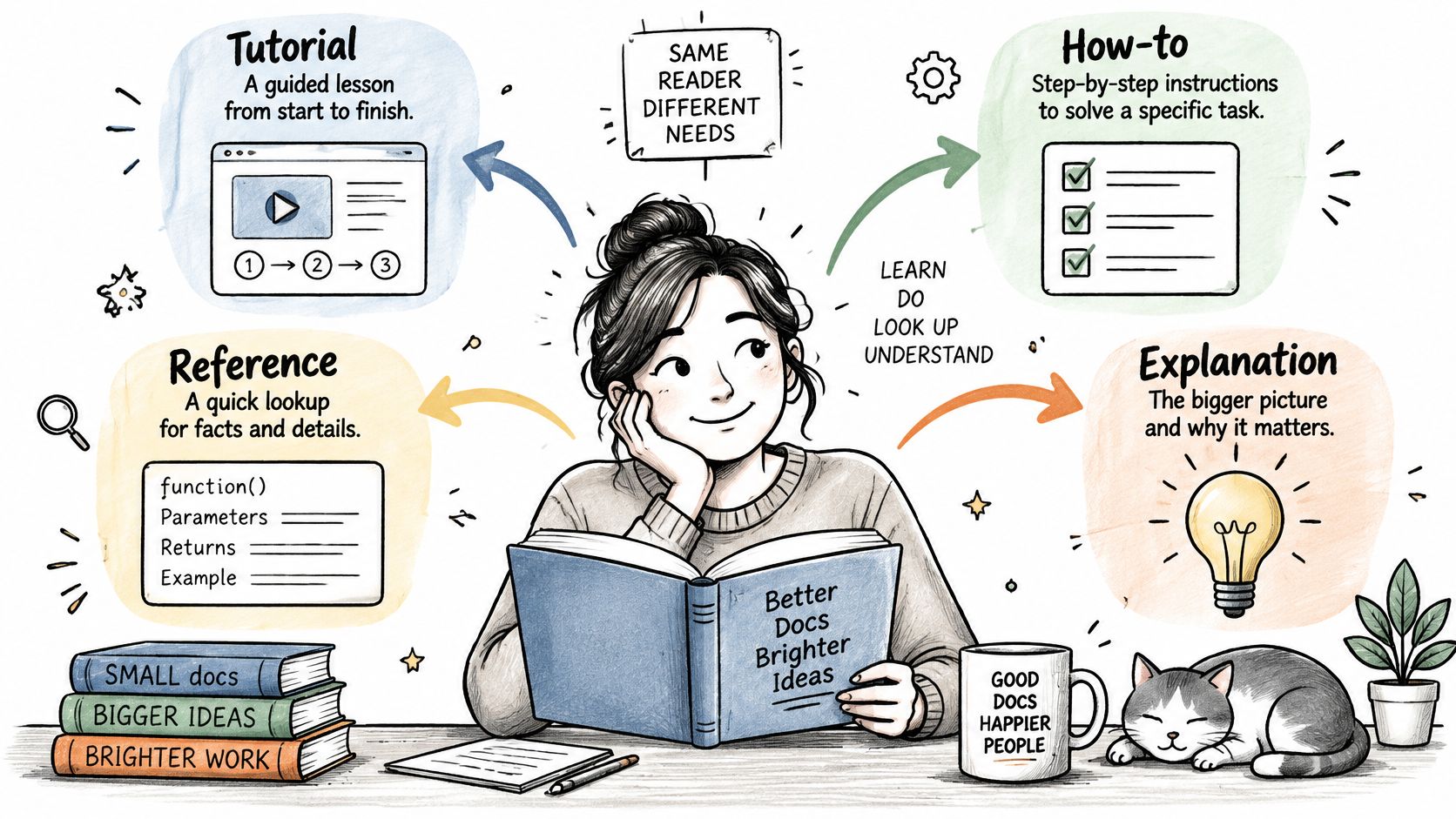
A reader under pressure should never hunt through theory to find a procedure. Diátaxis exists to stop that hunt. Daniele Procida created the framework around a simple rule: every page serves one of four needs. Tutorials teach beginners by doing. How-to guides walk through one task. Reference pages hold exact values and options. Explanation pages cover background and reasoning. Many software and open source projects organize their documentation on that split.
Before, a lockout page mixes energy theory between isolation steps. After, the how-to guide reads, "Stop the machine. Isolate the supply. Apply the lock. Test for zero energy." The theory moves to a linked explanation page, and the task path stays unbroken for the person standing in front of the equipment.
| Type | What the reader needs | Lockout content |
|---|---|---|
| Tutorial | Learn by doing | A guided first pass through the isolation sequence |
| How-to guide | Finish a task | The isolation steps in order, nothing else |
| Reference | Look up exact values | The equipment's approved values and options |
| Explanation | Understand why | How stored energy remains dangerous after shutdown |
The framework stops at page boundaries. It defines where content goes. It sets no warning format, no approved verb list, and no sentence length limit. A procedure can sit on the right page and still contain an ambiguous step. Teams get the safety benefit only when they apply a writing standard inside each content type.
That enforcement takes effort. Label each page before drafting. Audit existing pages that teach, explain, and instruct at once, then split them. The payoff is a manual where a technician under pressure always lands on the right kind of page.
How the Eight Standards Differ in Scope and Control
| Item | Primary Focus | Controlled Vocabulary | Sentence-Level Rules | Best For |
|---|---|---|---|---|
| ASD-STE100 Simplified Technical English | Clear technical and maintenance writing | Approved vocabulary with defined meanings | Limits sentence length and grammar; favors direct instructions | Safety-focused technical manuals and translation source text |
| Microsoft Writing Style Guide | Product documentation and UI text | No controlled vocabulary; offers terminology guidance | Practical rules for clarity, tone, and sentence structure | Consistent product, UI, and help content |
| Google Developer Documentation Style Guide | Developer documentation, APIs, and tutorials | No controlled vocabulary; gives word-choice guidance | Plain-language rules for global readers | Software and API documentation |
| ISO/IEC/IEEE 26511 Series for User Documentation | Documentation processes and quality | No vocabulary rules | Does not define sentence-level writing rules | Planning, reviewing, and managing user documentation |
| DITA (Darwin Information Typing Architecture) | Structured, reusable content and publishing | No vocabulary rules | Does not define sentence-level writing rules | Modular content for reuse and multichannel publishing |
| IBM Style Guide | General technical writing | No controlled vocabulary; offers terminology advice | Guidance on grammar, punctuation, and direct writing | Product manuals, online help, and developer content |
| S1000D International Specification for Technical Publications | Modular technical publications and data management | No vocabulary rules; often paired with controlled language | Does not define sentence-level writing rules | Large aerospace and defence maintenance information sets |
| Diátaxis Documentation Framework | Documentation structure by reader need | No vocabulary rules | Does not define sentence-level writing rules | Organizing tutorials, how-to guides, reference, and explanations |
Match the Standard to Your Manual's Safety Risk
Risk should drive the choice among technical documentation standards. Low-risk product help can work with a general style guide. Safety steps need tighter control over words, order, and review. The deciding question is simple. What's the harm if a reader gets one step wrong?
Controlled language fits warnings, isolation steps, and emergency actions. It limits word choice and forces short instructions. Style guides fit broad product sets where tone and consistency matter most. Structure frameworks fit reuse and findability problems, not sentence clarity alone.
Version control matters for exact compliance. The official ASD-STE100 website states Issue 9 was released on January 15, 2025, and it fully replaces earlier issues. Issue 9 revised wording for 31 existing rules and changed 555 dictionary entries, so old copies can mislead reviewers. Teams should name the issue in their documentation plan.
Adoption risk sits outside the writing rules. A 2023 international survey of 34 technical communicators reported incoherent content strategy affected 61% of respondents in cited DITA research. Difficulty proving return on investment affected 41%. Governance, training, and metrics aren't optional extras. They're part of the standard in practice.
Accessibility also needs more than short sentences. The SGS summary of the European Accessibility Act states the Act applies from 28 June 2025 to covered products and services. It requires technical documentation sufficient to assess accessibility conformity. A warning conveyed only by color can fail even when each word is simple. Teams need alternative text, logical reading order, accessible files, and conformity evidence.
A practical stack combines layers. One layer controls sentences in hazards and steps. One layer controls topic structure and reuse. One layer controls ownership, review triggers, and withdrawal of obsolete procedures. No single item on this list does all three well.
STE Guide offers educational explanations and a free heuristic checker for early draft review. The checker can miss problems or flag correct text. It doesn't replace review against the official ASD-STE100 Issue 9 specification. Teams should run it before formal review, then resolve findings with named technical and editorial approvers.
Selection should end in measurable checks. Sample high-risk procedures after rollout. Count ambiguous verbs, long steps, and warnings placed after the action. Track rework after safety review and translation queries per manual. Standards earn trust when those numbers fall and stay down.
STE Guide provides independent educational material on ASD-STE100, with writing rule summaries, before and after examples, and a free heuristic checker for early draft review. Those resources help technical writers, engineers, and translators apply tighter control to warnings and safety procedures. Visit STE Guide to start with the rules and check a draft before formal review.